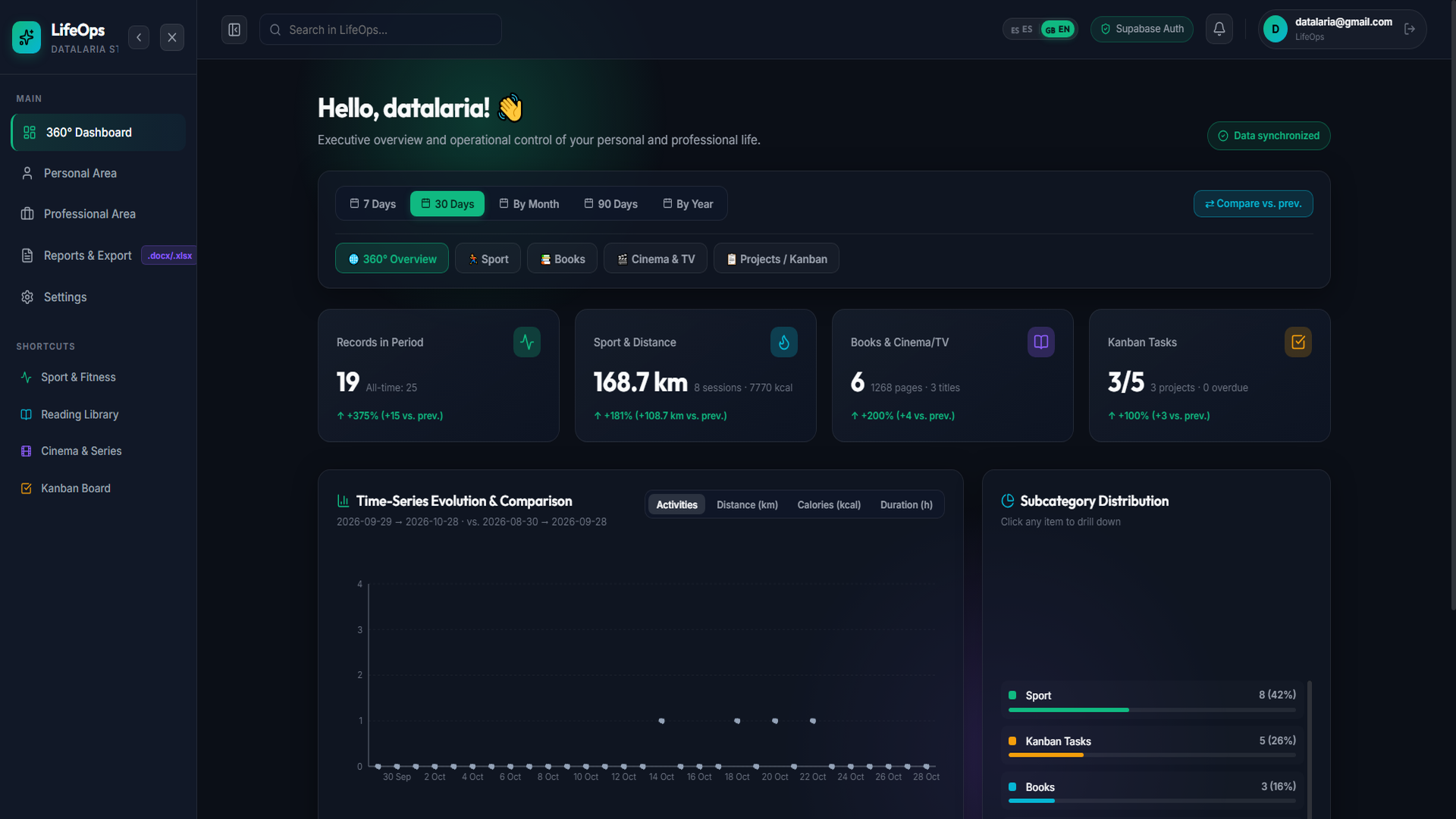
In Part 5 of our engineering series, we achieved a major milestone: deploying the entire LifeOps architecture 24/7 in production at zero cost ($0/month) by combining Netlify, Render, and Supabase, optimizing mobile ergonomics for smartphones, and installing the app as a native PWA.
However, once you start logging dozens of daily activities (workouts, bike rides, books read, movies watched, and Kanban tasks), a critical analytical challenge emerges: data without analysis lacks operational value.
Having 40 or 50 records in a PostgreSQL database is of little use if opening the dashboard doesn’t immediately answer executive questions such as:
- “How many kilometers did I run this month compared to last month?”
- “What percentage of my training went into sprint intervals versus long endurance runs?”
- “How has my daily consistency evolved, and what is my current active day streak?”
- “How can I filter exclusively by Running to inspect average pace and calories burned without mixing in gym workouts or movies?”
In this sixth installment, we tackle the full evolution of the 360° Analytics Dashboard, addressing both the deterministic client-side aggregation design and the most notorious UX challenge of zero-cost serverless infrastructure: cloud container sleep periods (cold-starts).
[!TIP] Try the analytics live: You can test the new 360° Dashboard with interactive data in Sandbox mode at https://datalaria.com/apps/lifeops/#/?mock=true&lang=en or log in with your Supabase account at https://datalaria.com/apps/lifeops/#/?lang=en.
LifeOps
All-in-one personal & professional OS: fitness tracking, book library, movies, Kanban tasks and projects.
🗺️ Full Roadmap of the LifeOps Series
- 🟢 Part 1: Personal Operating System Architecture and FastAPI + Supabase Backend
- 🟢 Part 2: React Frontend with Glassmorphism, 360° Dashboard, and Dark Mode Design System
- 🟢 Part 3: Core Modules: Sports, Reading Library, Cinema, and Professional Kanban Board
- 🟢 Part 4: Executive Reporting Engine in Word (.docx) and Multi-Sheet Excel Exports (.xlsx)
- 🟢 Part 5: 24/7 Cloud Deployment at Zero Cost ($0/month), Mobile Optimization, and PWA
- 🟢 Part 6 (This article): 360° Analytics Dashboard with Multi-Dimensional Filtering, Recharts, and Cold-Start Mitigation in Supabase + Render
1. Architecture Decision: External BI (Grafana / Metabase) vs. Native React Engine (ADR-013) ⚖️
When planning advanced charts and timeframe filters, the first engineering instinct is often to reach for established Business Intelligence tools like Grafana, Metabase, or Apache Superset. However, evaluating our requirements against our SDD Constitution led to architectural decision ADR-013:
| Evaluation Factor | External BI Tool (Grafana / Metabase) | Native React 19 + Recharts 3.10 Engine (Our Choice) |
|---|---|---|
| Multi-Tenant Security (RLS) | ❌ Requires static direct database connection. Passing individual Supabase Auth JWTs requires expensive Enterprise licenses or custom proxy tokens. | ✅ Perfect Isolation: consumes secure user-scoped REST endpoints protected by Row-Level Security (auth.uid() = user_id). |
| Infrastructure Cost | ❌ Requires a separate container running 24/7 with dedicated RAM, or paid cloud plans. | ✅ $0.00/month: compiles directly into the Netlify static bundle. |
Sandbox Demo Mode (?mock=true) |
❌ Impossible to feed an external iframe using in-memory mock state. | ✅ 100% Compatibility: runs instantly with deterministic synthetic data. |
| Filter Latency | ⚠️ Every click triggers a remote SQL round-trip to the cloud. | ✅ 0 ms: the timeframe dataset filters in client memory using pure useMemo hooks. |
| Mobile UX & Aesthetics | ⚠️ Visual disconnect from Glassmorphism Dark Mode and nested iframe scroll friction on mobile. | ✅ Unified Design: seamless responsive layout tailored to Datalaria’s design system. |
🔍 Haz clic en el diagrama para ampliarlo a pantalla completa
2. Multi-Dimensional Cascading Filters & Period-over-Period Deltas ⏱️📊
The cornerstone of the new experience is the Analytics Control Bar, enabling three levels of analytical exploration without page reloads:

A. Timeframe Resolution
The engine supports five time horizons powered by the deterministic resolveTimeWindows() function:
7 Days(week): Rolling last 7 days vs. immediately preceding 7 days.30 Days(month): Rolling last 30 days vs. immediately preceding 30 days.By Month(calendar_month): Dynamic month selector (JanuarytoDecember) and year, compared against the preceding calendar month.90 Days(quarter): Rolling last 90 days aggregated into weekly buckets.By Year(year): Full annual overview with 12 monthly buckets vs. prior year.
B. Invariant INV-8: Safe Percentage Delta Calculation ($\Delta\%$)
To compare current performance ($V_{\text{curr}}$) against the previous period ($V_{\text{prev}}$) without division-by-zero errors when starting a new discipline:
$$\Delta\% = \begin{cases} 0\% & \text{if } V_{\text{prev}} = 0 \text{ and } V_{\text{curr}} = 0 \\ +100\% & \text{if } V_{\text{prev}} = 0 \text{ and } V_{\text{curr}} > 0 \\ \text{round}\left(\dfrac{V_{\text{curr}} - V_{\text{prev}}}{V_{\text{prev}}} \times 100\right) & \text{otherwise} \end{cases}$$Implemented in lib/analyticsEngine.js:
export function computeDelta(currentVal, prevVal, unit = '', language = 'es') {
  const curr = Number(currentVal) || 0;
  const prev = Number(prevVal) || 0;
  const vsLabel = language === 'es' ? 'vs. ant.' : 'vs. prev.';

  if (prev === 0 && curr === 0) {
    return { positive: true, deltaPct: 0, text: 'Stable (0% vs. prev.)' };
  }
  if (prev === 0 && curr > 0) {
    return { positive: true, deltaPct: 100, text: `+100% (+${curr}${unit} ${vsLabel})` };
  }

  const diff = curr - prev;
  const pct = Math.round((diff / prev) * 100);
  const sign = diff >= 0 ? '+' : '';
  return {
    positive: diff >= 0,
    deltaPct: pct,
    diff,
    text: `${sign}${pct}% (${sign}${diff.toFixed(1)}${unit} ${vsLabel})`,
  };
}
3. The Visual Suite with Recharts: Contextual KPIs, Time-Series & Donut Charts 📈🍩
Selecting a category or drilling down into a subcategory (for example, filtering by Sport ➔ Running) dynamically updates the entire dashboard:
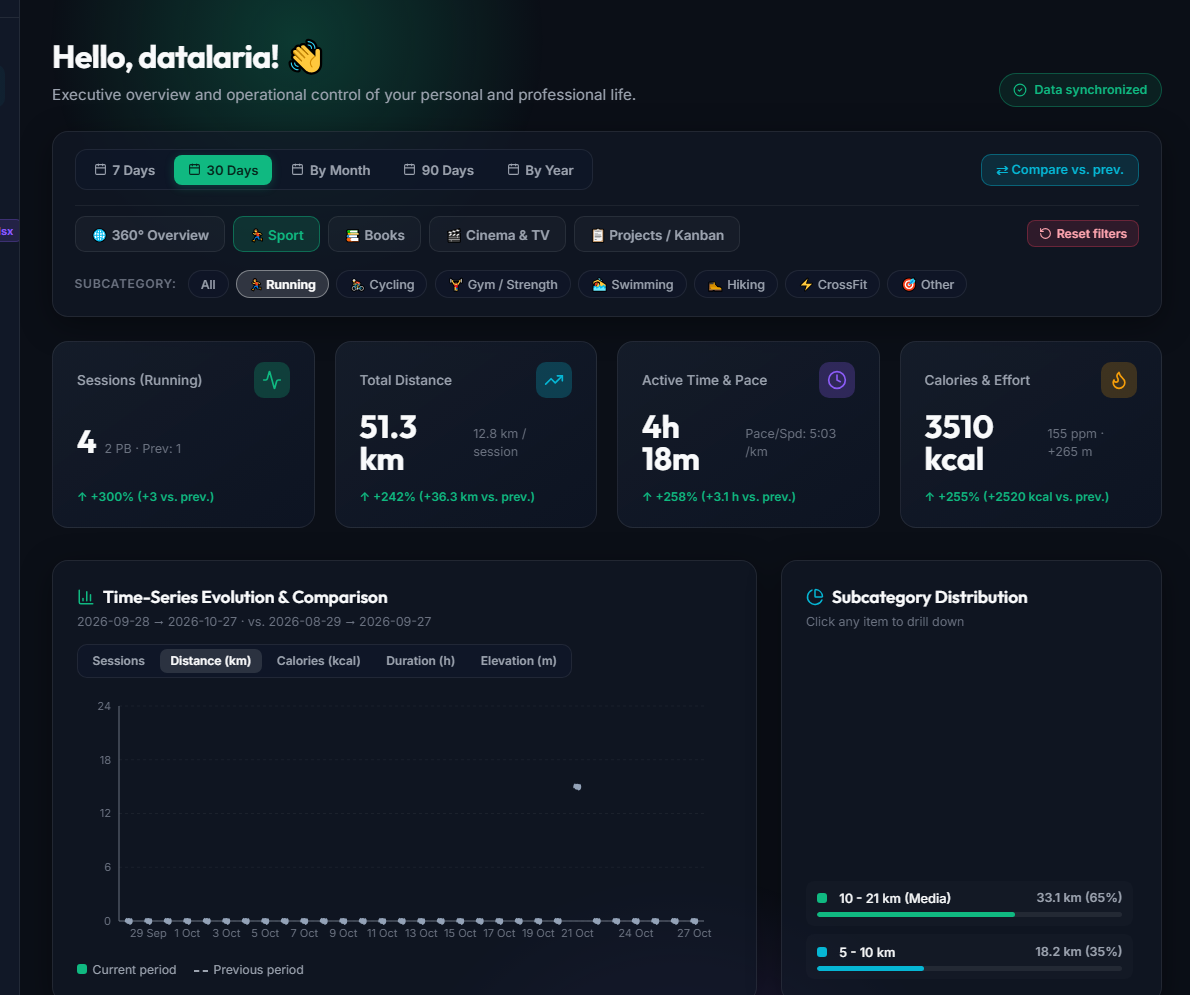
- 4 Contextual KPI Cards:
- In Sport: adapt metrics to the selected discipline:
- Sessions: workout count with $\Delta\%$ badge and personal bests (PB).
- Distance: cumulative mileage and average km per session.
- Time & Pace: active duration and average pace (
min/kmin running orkm/hin cycling). - Calories & Effort: calories burned, average heart rate (
bpm), and elevation gain (+m).
- In Sport: adapt metrics to the selected discipline:
- Multi-Metric Time-Series Chart (
ComposedChart):- Renders current period bars color-coded by category and overlays a dashed trendline of the previous period when the
⇄ Compare vs. prev.toggle is active. - Built-in metric switcher: toggle on the fly between Sessions, Distance (km), Calories (kcal), Duration (h), or Elevation Gain (m).
- Renders current period bars color-coded by category and overlays a dashed trendline of the previous period when the
- Subcategory Distribution (
PieChartDonut):- Displays percentage and absolute shares for each activity type. Clicking any slice or legend item applies an automatic drill-down into that subcategory.
4. 16-Week Daily Consistency Heatmap (Strava / GitHub Style) 🔥🗓️
Habit formation thrives on visual streaks. To offer a bird’s-eye view of consistency, we introduced a 112-day matrix (16 weeks × 7 days, Monday to Sunday):
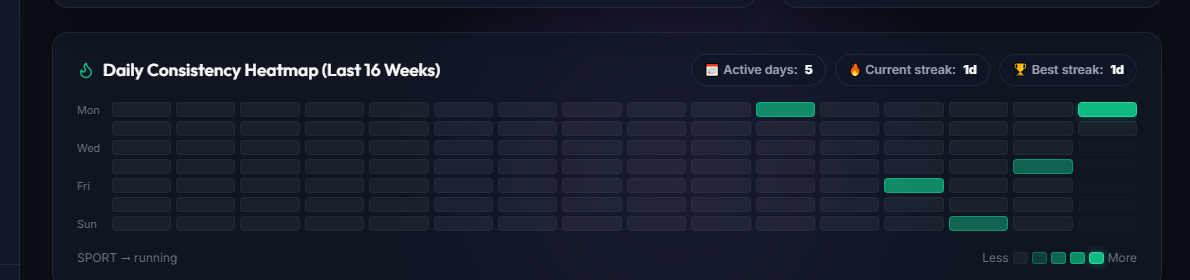
The algorithm evaluates daily volume into 5 intensity levels (level-0 to level-4) and computes in real time:
- Active days in the period.
- Current active streak: tracking consecutive days backward from today or yesterday.
- All-time best streak.
5. Solving the Zero-Cost Cloud Latency Challenge: Render Cold-Start Mitigation ⚡🛡️
Deploying full-stack applications on free cloud tiers (such as Render.com’s Free Web Service) entails an inherent constraint: containers spin down to sleep after 15 minutes of inactivity.
When a user visits the app after a few hours of idle time, the first request can take 20 to 40 seconds while the Python virtual machine boots up. In early versions, this latency caused an alarming UX defect: users saw 0 across all cards and blank charts, mistakenly believing their data had been erased or lost.
To eliminate this friction while preserving the $0/month infrastructure cost, we engineered a 3-tier solution:
Tier 1: Early Silent Pre-Warming (wakeUpServer)
The moment the browser loads the SPA inside AuthContext.jsx, before user authentication or navigation even finishes, a non-blocking fetch pings /health. This grants the backend container a 5-to-10 second head start to wake up.
Tier 2: Stale-While-Revalidate (SWR) Local Cache per User (INV-10)
Every successful GET response (/api/v1/activities/details, /tasks, /stats/dashboard) is cached in localStorage strictly namespaced by user ID (lifeops_swr_v1:<user_id>:<endpoint>).
- On subsequent visits, records and charts hydrate in less than 10 milliseconds (
0 msperceived delay). - Users interact with their data instantly while a background request synchronizes any fresh server changes.
- Any mutation (
POST,PATCH,DELETE) automatically clears the cache to ensure strict data consistency.
Tier 3: Foreground Cloud Sync Banner & Loading Placeholders
When opening the app on a fresh device or cleared browser cache:
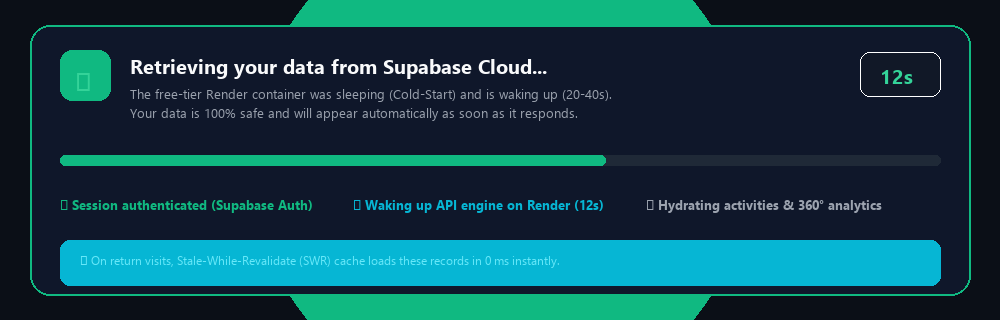
- Never show misleading zeroes: KPI cards display waiting indicators (
···) instead of0. - Prominent Foreground Banner: renders an animated spinner, live elapsed seconds counter (
0s, 1s, 2s...), visual progress bar, and connection stages:✓ Session authenticated (Supabase Auth)⟳ Waking up API engine on Render Cloud⏳ Hydrating activities & 360° analytics
- After 4 seconds, the banner transparently explains that the cloud container is waking up and that data is 100% secure.
- Smart Timeframe Auto-Fit: if the query returns records but none fall within the last 30 days (for example, after a holiday break), the dashboard automatically switches to
90 DaysorBy Yearso charts populate immediately.
6. Summary and Next Steps 🚀
With this evolution, LifeOps matures from a basic tracking tool into a true personal and professional intelligence operating system. Pairing a deterministic in-memory client engine with cold-start resilient caching demonstrates that fast, secure, and visually refined web applications can be built and maintained with a cloud bill of exactly $0.00/month.
Explore the web application, source code, and full technical specifications:
- 🎮 Deployed Web App: https://datalaria.com/apps/lifeops/
- 🕹️ Interactive Sandbox Mode (No Sign-Up): https://datalaria.com/apps/lifeops/#/?mock=true&lang=en
- 📋 Official LifeOps Technical Spec Sheet: /en/apps/lifeops/