This is a submission for the Algolia Agent Studio Challenge: Consumer-Facing Conversational Experiences
What I Built
Ops Engineering Copilot is an AI-powered chat widget that lives on my Hugo blog and answers visitor questions using conversational AI grounded in my actual content.
Ask it “What is Datalaria?” and instead of a generic response, you get:
“Datalaria is a technical blog focused on data engineering, artificial intelligence, and business operations. As the Ops Engineering Copilot, I specialize in providing actionable, engineering-focused advice across four key pillars: S&OP, Product, Projects, and People…”
This is NOT just search – it’s a conversational agent that synthesizes knowledge from 72 indexed posts to provide contextual, helpful answers.
Demo
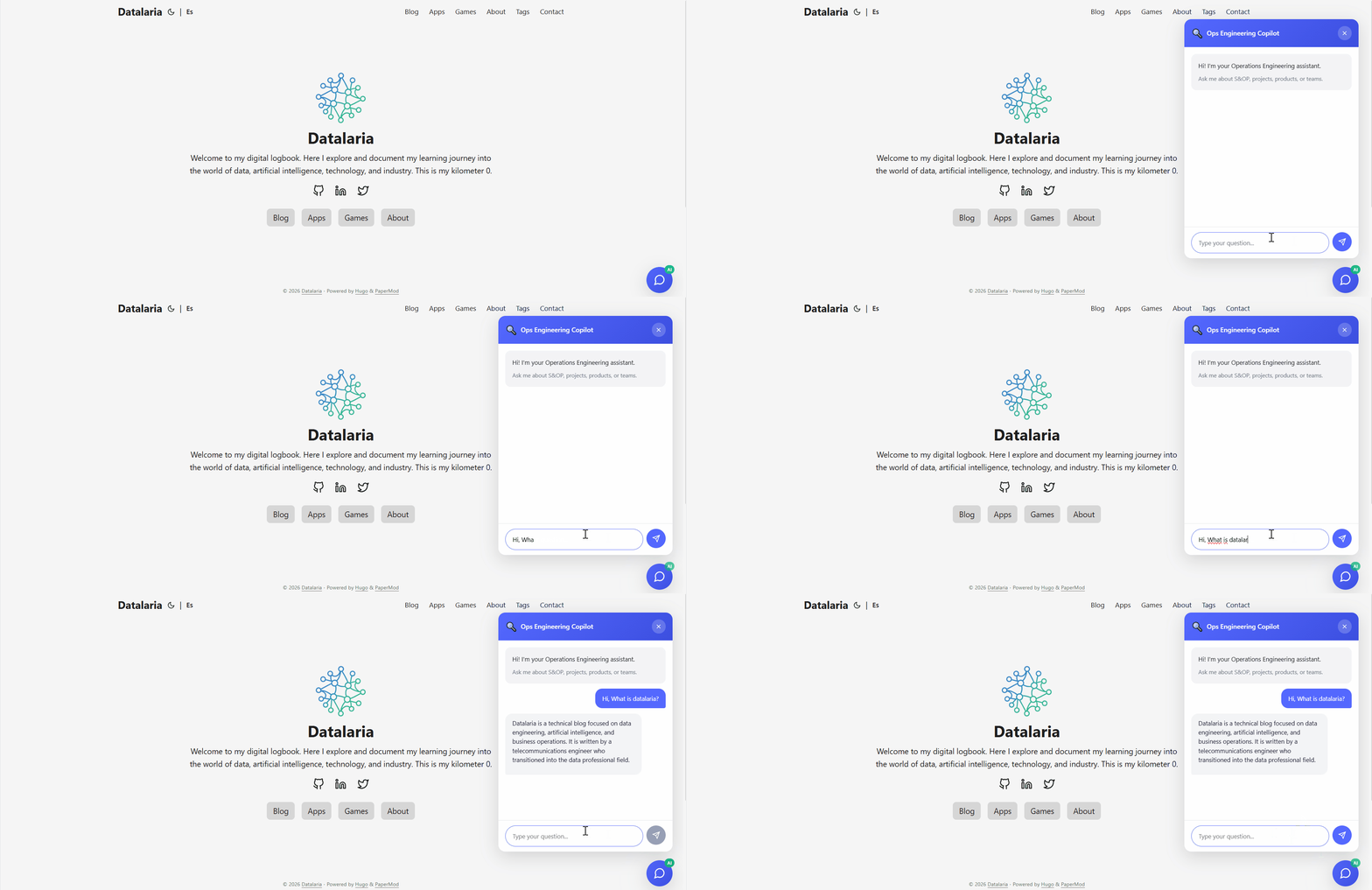
Live Demo: datalaria.com
Try these questions:
- “What is the Autopilot project?”
- “How do I detect outliers in S&OP data?”
- “Tell me about GitHub Actions automation”
The Architecture
This project extends my existing Autopilot system (documented in Parts 1-7) with a new capability: consumer-facing AI search.
72 Markdown Posts"] Sync["🐍 Python Sync Script
algolia_sync.py"] Index["☁️ Algolia Index
datalaria_posts"] end subgraph "Algolia Agent Studio" Agent["🤖 Ops Engineering Copilot
Agent ID: f27a..."] LLM["🧠 Google Gemini
LLM Provider"] RAG["📚 RAG Pipeline
Context Retrieval"] end subgraph "Frontend" Widget["💬 Chat Widget
algolia-agent.html"] Netlify["⚡ Netlify Function
agent-chat.js"] end subgraph "User" Visitor["👤 Blog Visitor"] end Hugo -->|"Extract & Clean"| Sync Sync -->|"Push Records"| Index Index -->|"Provides Context"| RAG RAG -->|"Augments Prompt"| LLM LLM -->|"Generates Response"| Agent Visitor -->|"Question"| Widget Widget -->|"POST /agent-chat"| Netlify Netlify -->|"Completions API"| Agent Agent -->|"AI Answer"| Netlify Netlify -->|"Display"| Widget style Agent fill:#5468ff,color:white style LLM fill:#4285f4,color:white style Index fill:#5468ff,color:white
🔍 Haz clic en el diagrama para ampliarlo a pantalla completa
Key Components
| Component | Technology | Purpose |
|---|---|---|
| Content Source | Hugo + Markdown | 72 bilingual posts (EN/ES) |
| Indexing | Python + Algolia API | Extract, clean, classify, push |
| Agent | Algolia Agent Studio | RAG + LLM orchestration |
| LLM | Google Gemini | Response generation |
| Proxy | Netlify Functions | CORS bypass + error handling |
| Widget | Vanilla JS | Embedded chat interface |
How I Used Algolia Agent Studio
Step 1: Indexing the Knowledge Base
The foundation is a Python script that processes all Hugo posts and pushes them to Algolia:
# algolia_sync.py - Key extraction logic
def extract_post_data(filepath: Path, lang: str) -> Optional[Dict]:
    """Extract and clean post data for Algolia indexing."""
    post = frontmatter.load(filepath)

    # Clean markdown to plain text
    html = markdown.markdown(post.content)
    soup = BeautifulSoup(html, 'html.parser')
    clean_text = soup.get_text(separator=' ', strip=True)

    # Classify into operational domains
    domain = classify_domain(post.metadata.get('categories', []))

    return {
        'objectID': generate_object_id(filepath),
        'title': post.metadata.get('title', ''),
        'content': clean_text[:8000],  # Algolia limit
        'description': post.metadata.get('description', ''),
        'url': build_url(filepath, lang),
        'lang': lang,
        'domain': domain,  # S&OP, Product, Projects, People
        'date': post.metadata.get('date'),
        'tags': post.metadata.get('tags', []),
    }
Result: 72 records indexed (36 English + 36 Spanish) across 4 operational domains.
Step 2: Configuring the Agent in Agent Studio
In the Algolia dashboard, I created an agent with a specialized system prompt:
You are the "Ops Engineering Copilot" for the Datalaria technical blog.

Your expertise spans four pillars:
- 📊 S&OP: Demand forecasting, data hygiene, outlier detection
- 📦 Product: Lifecycle management, data-driven decisions
- 📋 Projects: CI/CD, GitHub Actions, automation, DevOps
- 👥 People: Team dynamics, onboarding, collaboration

Guidelines:
1. Ground all answers in the indexed blog content
2. Be conversational but technically precise
3. When relevant, suggest specific articles to read
4. Support both English and Spanish queries
LLM Provider: Google Gemini (excellent free tier for prototyping)
Step 3: The CORS Problem (and Solution)
Here’s where it got interesting. The Agent Studio API doesn’t allow direct browser calls due to CORS restrictions. My first attempt:
// ❌ This fails with CORS error
fetch('https://agent-studio.eu.algolia.com/1/agents/{id}/completions', {
    method: 'POST',
    headers: { 'X-Algolia-API-Key': key }
});
Solution: A Netlify Function as a proxy:
// netlify/functions/agent-chat.js
exports.handler = async (event) => {
    const { query, conversationId } = JSON.parse(event.body);

    // Call Agent Studio from server-side (no CORS!)
    const response = await fetch(
        `https://agent-studio.eu.algolia.com/1/agents/${AGENT_ID}/completions?compatibilityMode=ai-sdk-4&stream=false`,
        {
            method: 'POST',
            headers: {
                'Content-Type': 'application/json',
                'X-Algolia-API-Key': SEARCH_KEY,
                'X-Algolia-Application-Id': APP_ID
            },
            body: JSON.stringify({
                messages: [{ role: 'user', content: query }],
                id: conversationId
            })
        }
    );

    const data = await response.json();

    return {
        statusCode: 200,
        body: JSON.stringify({
            answer: data.content,
            conversationId: data.id
        })
    };
};
Key discoveries:
compatibilityMode=ai-sdk-4is requiredstream=falsereturns JSON instead of SSE- Response format is
{id, role, content}, not OpenAI-style
Step 4: The Chat Widget
A lightweight vanilla JS widget that integrates with Hugo:
<!-- layouts/partials/algolia-agent.html -->
<script src="https://cdn.jsdelivr.net/npm/algoliasearch@4/dist/algoliasearch-lite.umd.js"></script>

<script>
async function sendMessage() {
    const query = input.value.trim();

    try {
        // Try Agent Studio via Netlify proxy
        const response = await fetch('/.netlify/functions/agent-chat', {
            method: 'POST',
            body: JSON.stringify({ query, conversationId, language })
        });

        const data = await response.json();
        addMessage(data.answer, 'agent');

    } catch (error) {
        // Fallback to direct Algolia search
        await fallbackSearch(query);
    }
}
</script>
Features:
- 🌙 Dark mode support
- 📱 Mobile responsive
- 🌐 Bilingual (ES/EN)
- ⚡ Graceful fallback to search if Agent fails
Technical Challenges
Challenge 1: The 422 Validation Error
My first API calls returned 422: Field required: compatibilityMode. The documentation mentioned it, but I missed it initially.
Fix: Added query parameters ?compatibilityMode=ai-sdk-4&stream=false
Challenge 2: Streaming Response Format
Even after fixing the 422 error, I got SyntaxError: Unexpected token 'f:'. The API was returning SSE format (f:{"message"...) instead of JSON.
Fix: Added stream=false to disable streaming.
Challenge 3: Response Parsing
The response structure wasn’t OpenAI-compatible. I expected choices[0].message.content but got {id, role, content}.
Fix: Updated parsing logic to check data.content first.
Results
| Metric | Value |
|---|---|
| Posts Indexed | 72 (36 EN + 36 ES) |
| Avg Response Time | ~3-4 seconds |
| Fallback Coverage | 100% (graceful degradation) |
| Languages Supported | English & Spanish |
| Deployment | Fully automated via Netlify |
Source Code
The complete implementation is open source:
- Indexing Script: algolia_sync.py
- Netlify Function: agent-chat.js
- Chat Widget: algolia-agent.html
What’s Next
This is Part 8 of my Autopilot series. The system now has:
- ✅ Content Generation (Parts 1-3): AI creates social posts
- ✅ Distribution (Parts 4-5): Automated publishing to Twitter/LinkedIn
- ✅ Newsletter (Part 6): Automated email campaigns
- ✅ Quality Control (Part 7): Copilot CLI auditing
- ✅ Consumer Search (Part 8): AI-powered Q&A - You are here
Why Fast Retrieval Matters
In Operations Engineering, decisions happen fast. When a supply chain analyst asks “What’s the best practice for detecting demand outliers?”, they need answers in seconds, not minutes of browsing through archives.
Algolia’s millisecond retrieval makes this possible:
| Scenario | Without Fast Retrieval | With Algolia |
|---|---|---|
| Find relevant article | ~30-60s browsing | ~100ms retrieval |
| Get synthesized answer | Manual reading required | ~3-4s AI response |
| Context accuracy | May miss related content | RAG ensures completeness |
The RAG pipeline works because:
- Fast vector search finds semantically similar content across 72 posts instantly
- Faceted filtering narrows results by language and domain (S&OP, Projects, Product, People)
- Snippet extraction provides the LLM with precisely relevant context
Without sub-second retrieval, the conversation would feel sluggish and users would abandon the chat. Algolia enables the “instant” in instant knowledge discovery – transforming a static blog into an interactive, AI-powered knowledge base.
Conclusion
Algolia Agent Studio transforms a static blog into an interactive knowledge base. Instead of forcing visitors to search and read multiple posts, they can simply ask and get synthesized answers.
The combination of:
- Algolia Search (fast, relevant retrieval)
- Agent Studio (RAG orchestration)
- Google Gemini (natural language generation)
- Netlify Functions (serverless proxy)
…creates a powerful, cost-effective AI assistant that runs 24/7.
Questions? Try the live demo at datalaria.com or drop a comment below 👇
This post is part of the Autopilot Project series, where I document how I automate content creation, distribution, and now consumer interaction using AI.